

Google Sheet - Campaign Sources
Set up a Google Apps Script from your google sheet to create an automated connection from your Podcast/YouTube/Influencer list to your managed auto suggest list in Fairing. The managed auto suggest list powers your auto suggest response options.
A Google Apps Script is a small piece of code that lives inside your spreadsheet. There is nothing to install and nothing to host. Once it's set up, the spreadsheet gets a new Fairing menu, and everything runs automatically from there on the cadence you set.
Step 1: Set up your sheet
Set up each list as its own tab, or its own google sheet. Name the tabs and columns as shown below. Only create tabs for the lists relevant to your brand - the script will automatically skip lists that don't exist in the sheet (for example, omit Podcasts if not relevant to your brand).
- Put your header names in row 1. The script finds each column by its header name, not by the column position (i.e. column A), so the column order does not matter and it does not matter if there is extra data columns in the sheet that will not be synced.
- Header names are not case-sensitive.
- Tab names are case-sensitive and must match exactly.
- Accepted
Channelvalues: Instagram; TikTok; Facebook
| List | Tab Name | Required Headers | Optional Headers |
|---|---|---|---|
| Podcast | Podcasts | Podcast name | N/A |
| YouTube | YouTube | Creator name | Handle |
| Influencer | Influencers | Creator name; Channel | Handle |
Step 2 — Add the script
- In the spreadsheet menu, click Extensions → Apps Script.
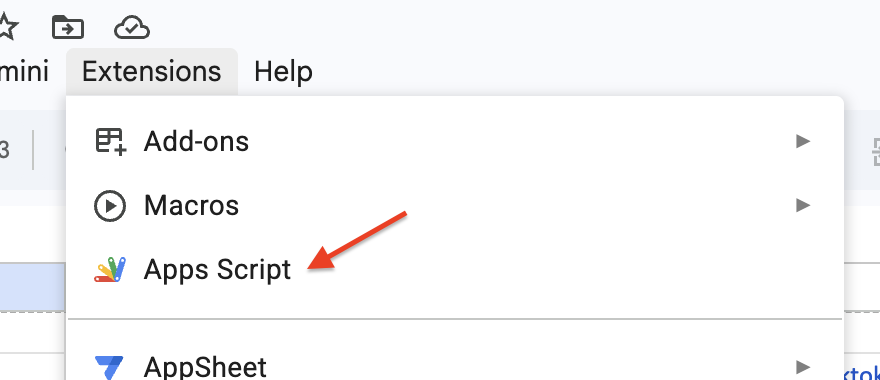
- A new tab will open to a file called
Code.gs. Select the placeholder code and delete it.
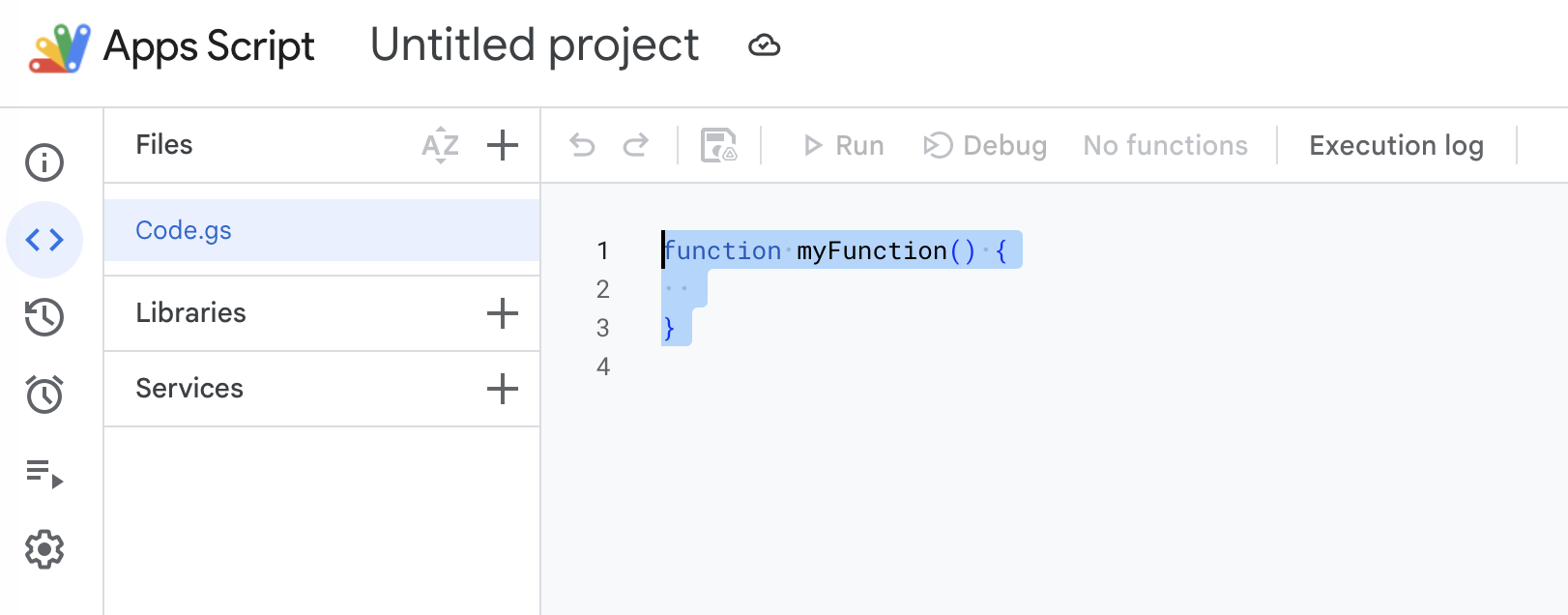
- Copy the entire script from the end of this document and paste it in.
- Rename the Project i.e.
Fairing List Sync. - Click the Save icon.
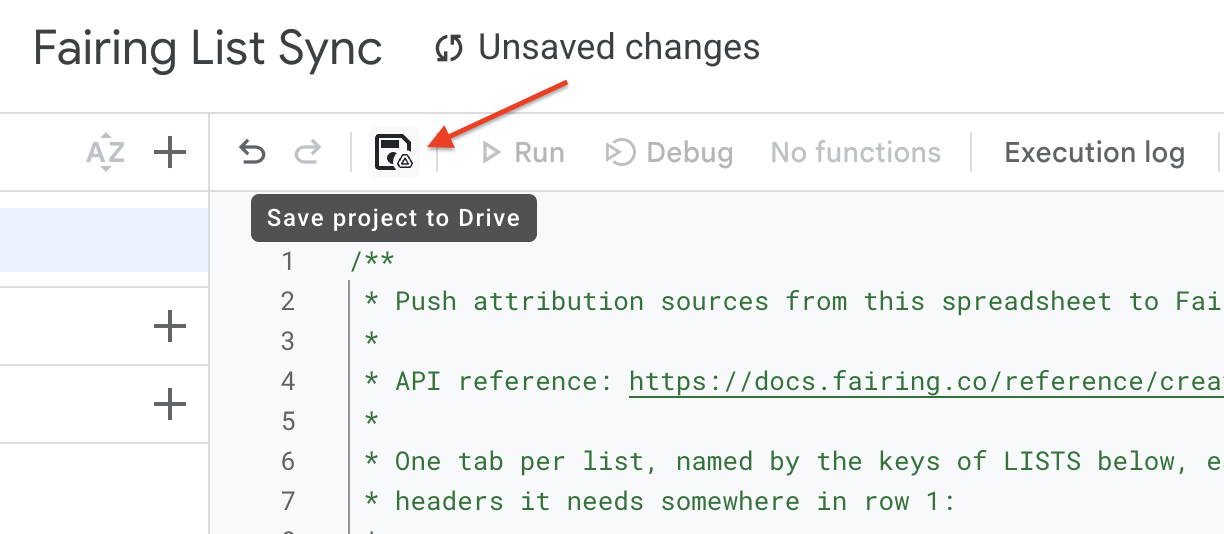
- Go back to your spreadsheet tab and reload the page.
A Fairing menu now appears in the menu bar, to the right of Help. If you don't see it, reload the page again (it may take a minute or two).
Step 3: Save your Fairing API key
- In Fairing, go to Settings → API Credentials and copy your Secret Token.

- In the google sheet, click Fairing → Set API key.
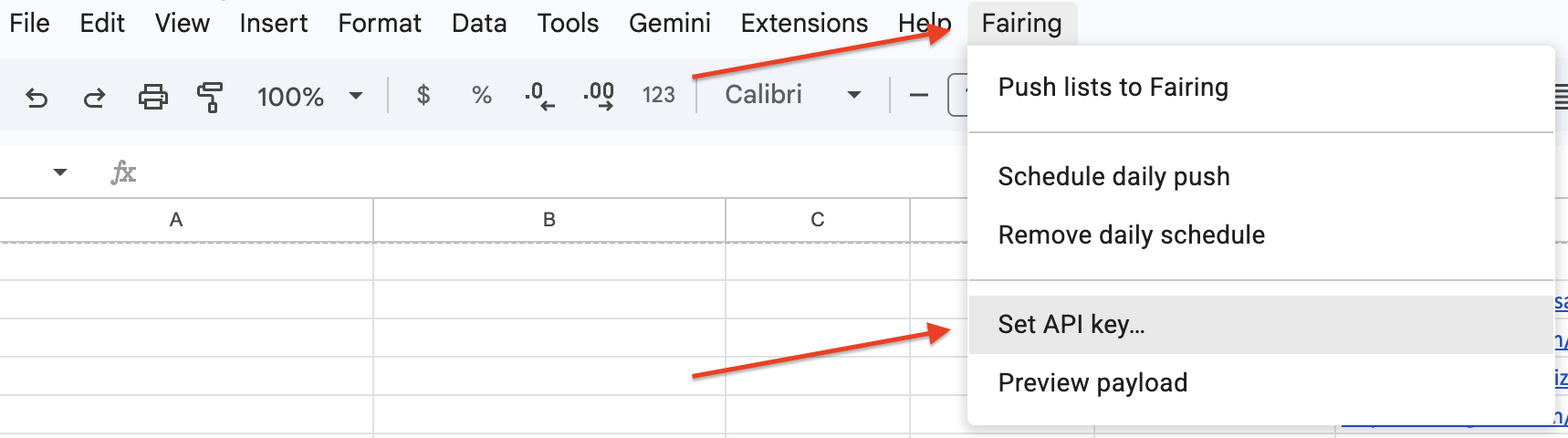
- Paste your Secret Token and click OK.
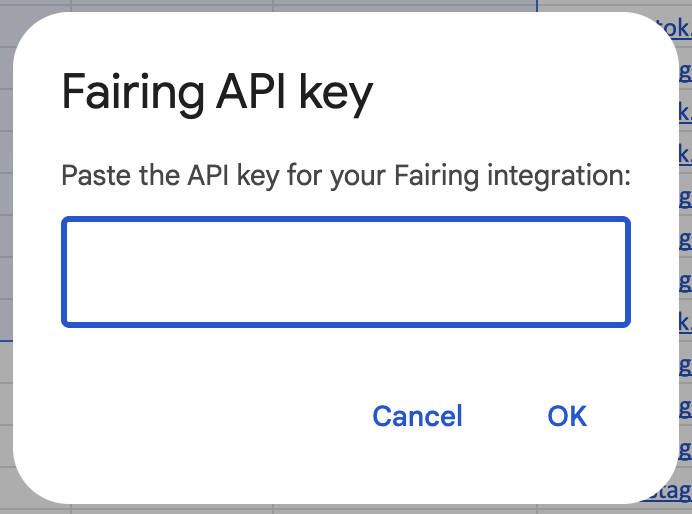
Step 4: Grant the script permission
The first time you run anything, Google will ask for permission. You will only need grant the permissions once.
-
When the permission dialog appears, click Continue and pick your Google account.
Note: Google may show a "Google hasn't verified this app" warning. This appears for all custom scripts, including ones you wrote yourself.
-
Review the permission list - reading your spreadsheet and connecting to an external service - and click Select all and then Continue.
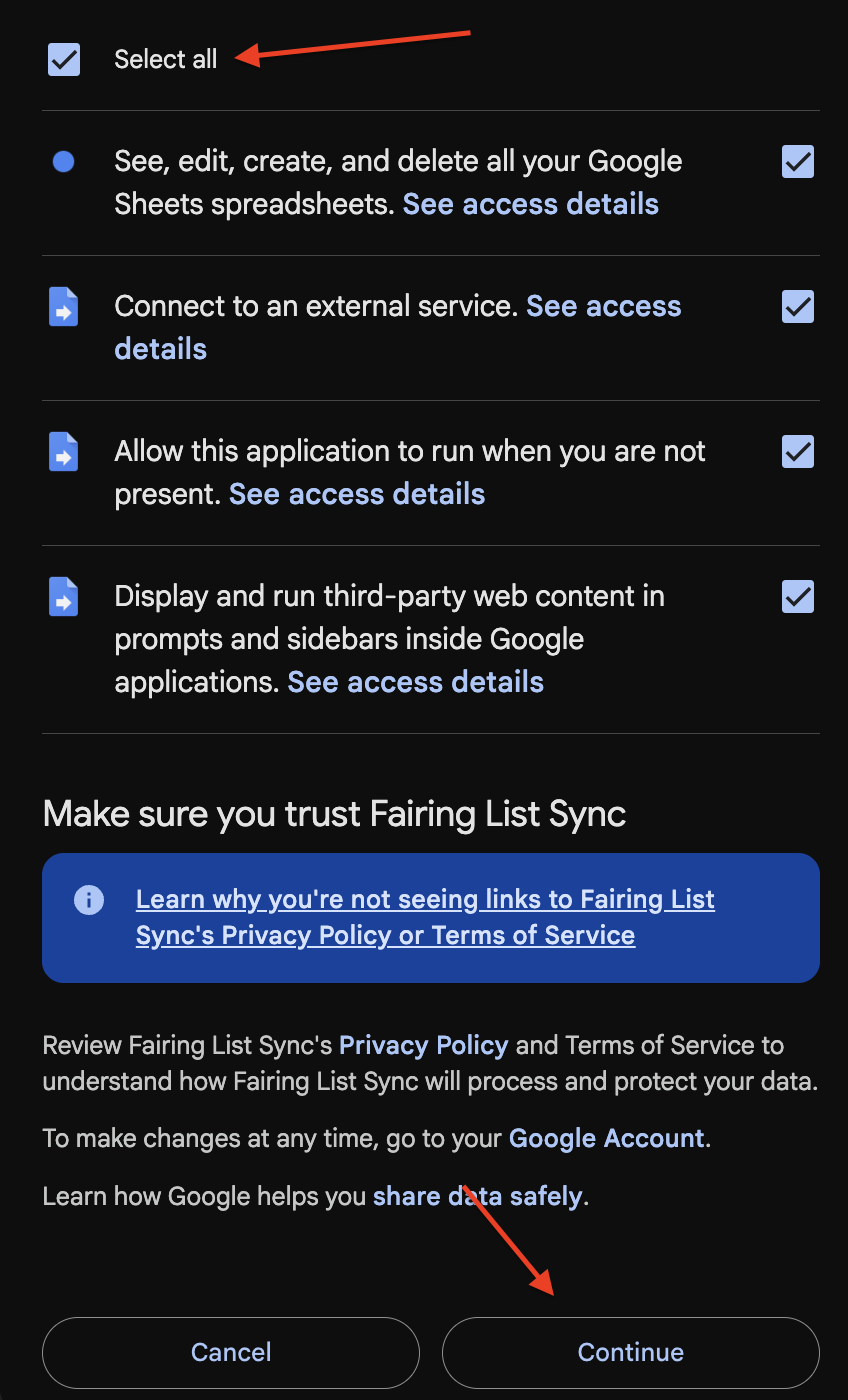
Step 5: Send a manual sync
To manually sync to Fairing, click Fairing → Push lists to Fairing.
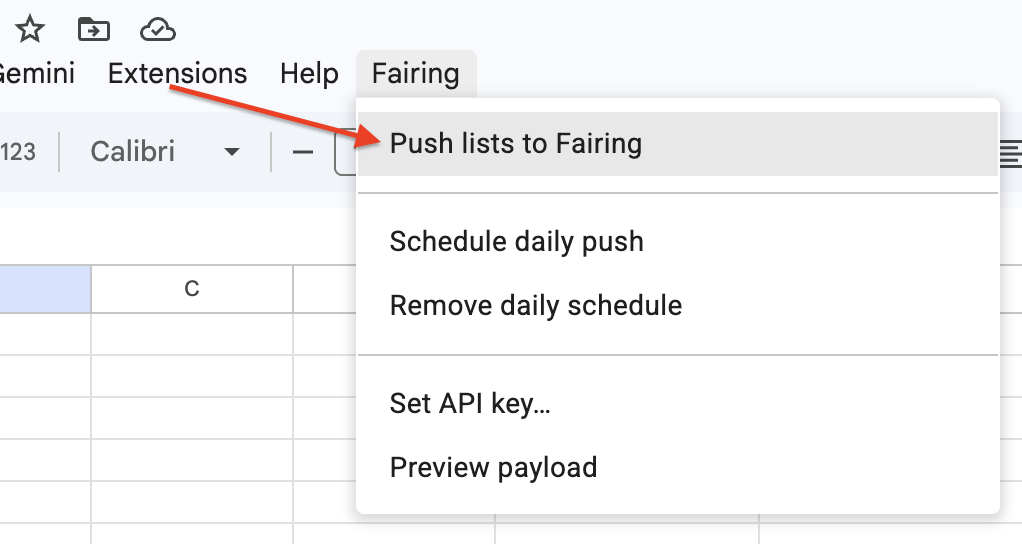
After a moment you'll get a summary, broken down by tab. Accepted is the number of sources Fairing now holds for you - not the number that were new this run.
Example:
Fairing sync complete.

Podcasts: 24 accepted
YouTube: 9 accepted
Influencers: 18 accepted
If anything is rejected, the summary names the tab, the row and the reason, so you can fix it and run again. See Troubleshooting for what the messages mean.
If you'd rather check before sending anything, use Fairing → Preview payload instead. It shows how many sources would go and writes the exact data to the log, without sending it.
Step 6: Schedule an automated sync
Once you've confirmed a manual push works, set up an automated sync.
- Click Fairing → Schedule daily push.
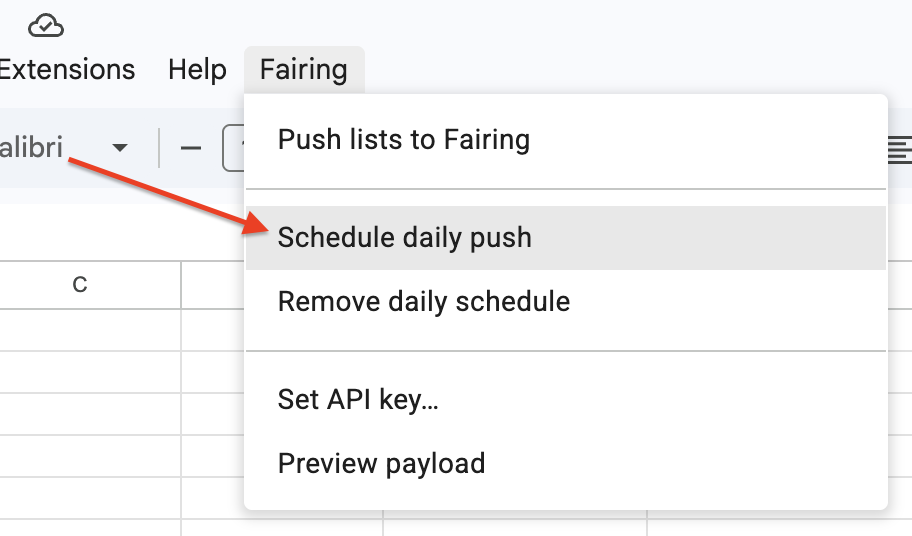
- You will get a confirmation that the sync is scheduled with the hour it will run.
Now a row added to any tab will be picked up on the next run. The spreadsheet does not need to be open for the automated sync to run. One schedule covers every list tab.
To change the time, open the script editor and find the below line. Change the number to any hour on a 24-hour clock, save, then click Schedule daily push again.
const DAILY_TRIGGER_HOUR = 6; // Script's time zone (Project Settings)To turn it off, click Fairing → Remove daily schedule. The menu item for manual pushes keeps working.
What to expect
- Pushing the same options twice is harmless. Fairing automatically dedupes entries that are the same (case insensitive).
- Fixing a typo adds a new response option. Correcting a name in the sheet sends the corrected version, but the original stays in your Fairing account. Edit or remove the old one directly in Fairing.
- Adding a handle after an initial sync adds a new response option, edit or remove the old response directly in Fairing.
- Deleting a row doesn't remove the source. Taking a creator out of the sheet stops them being sent, but Fairing keeps what it already has. Remove it in Fairing if you want the response option removed from your survey.
- Checking on a scheduled run: in the spreadsheet, go to Extensions → Apps Script, then click Executions in the left sidebar. Every run is listed with its status and result.
Troubleshooting
| What you see | What it means | What to do |
|---|---|---|
| No Fairing menu | The spreadsheet hasn't reloaded since you saved the script | Reload the page |
No list tabs found… | No tab is named Podcasts, YouTube or Influencers | Rename your tab to match exactly, including the capital letters |
No Fairing API key set | The key was never saved, or was cleared | See instructions. |
401 Unauthorized | The key is wrong, incomplete, or no longer valid | Re-paste the key. |
429 Too Many Requests | Too many runs in quick succession | Wait a minute and run it again. Nothing was lost. |
channel: can't be blank | An influencer row has a name but no channel | Fill in the channel column in the appropriate tab. |
channel: unsupported channel: … | The platform is misspelled or not supported | Use Instagram, TikTok, or Facebook, spelled exactly |
The … tab is missing a 'X Name' column | No header in row 1 matches | Add the header the message names. It can sit in any column. |
| Daily sync stopped running | The schedule was removed, or runs are failing | Check Extensions → Apps Script → Executions, then re-run Schedule daily push |
Still having trouble? Contact [email protected] and we'll take a look.
The script
Copy everything below and paste it into Code.gs, replacing whatever is there. There is nothing to configure.
/**
 * Push attribution sources from this spreadsheet to Fairing.
 *
 * API reference: https://docs.fairing.co/reference/create-sources
 *
 * One tab per list, named by the keys of LISTS below, each carrying the
 * headers it needs somewhere in row 1:
 *
 *   Podcasts     Podcast Name
 *   YouTube      Creator Name   [Handle]
 *   Influencers  Creator Name   Channel   [Handle]
 *
 * Columns are located by header name, not position, so the sheet can hold
 * the customer's own columns in any order alongside them.
 *
 * Only the tabs that exist are read, so a spreadsheet can carry one list or
 * both, and a list can be added later by creating its tab. Every other tab in
 * the spreadsheet is ignored.
 *
 * Every run sends every list tab in full. Fairing dedupes case-insensitively
 * on channel + name + channel_source_id against what this shop and contributor
 * already link, so a source that is already there is returned as-is and
 * nothing is written. Resending is a no-op, which is what makes the daily
 * schedule safe, and it also picks up names corrected after an earlier run.
 *
 * Two entry points share one core: `pushSources` reports through dialogs and
 * is what the menu calls, `pushSourcesDaily` reports through the execution
 * log and is what the daily trigger calls. A trigger has no UI attached, so
 * it must never touch SpreadsheetApp.getUi().
 */

/**
 * The list tabs, keyed by the tab name to look for. `fixedChannel` names the
 * channel every row on that tab uses; when it is empty, each row's channel is
 * read from its own Channel column, which then becomes a required header.
 * `nameHeader` is the header that list's name column must carry, and every
 * list declares one.
 */
const LISTS = {
  Podcasts: { fixedChannel: 'Podcast', nameHeader: 'Podcast Name' },
  YouTube: { fixedChannel: 'YouTube', nameHeader: 'Creator Name' },
  Influencers: { fixedChannel: '', nameHeader: 'Creator Name' }
};

/**
 * Accepted headers for the columns named the same on every list. The name
 * column differs per list and comes from LISTS instead. Columns are found by
 * header rather than by position, so a customer can reorder them or keep
 * columns of their own between them. Matching is case-insensitive and
 * trimmed; where a field lists more than one spelling, the first found wins.
 */
const COLUMNS = {
  channel: ['channel', 'platform'],
  handle: ['handle', 'username']
};

const FAIRING_API_URL = 'https://app.fairing.co/api/sources';

const HEADER_ROWS = 1;

const BATCH_SIZE = 100; // API hard limit: 100 sources per request
const MAX_RETRIES = 3;

const API_KEY_PROPERTY = 'FAIRING_API_KEY';

const DAILY_TRIGGER_FUNCTION = 'pushSourcesDaily';
const DAILY_TRIGGER_HOUR = 6; // Script's time zone (Project Settings)

/** Adds the Fairing menu when the spreadsheet opens. */
function onOpen() {
  SpreadsheetApp.getUi()
    .createMenu('Fairing')
    .addItem('Push lists to Fairing', 'pushSources')
    .addSeparator()
    .addItem('Schedule daily push', 'scheduleDailyPush')
    .addItem('Remove daily schedule', 'removeDailySchedule')
    .addSeparator()
    .addItem('Set API key…', 'setApiKey')
    .addItem('Preview payload', 'previewPayload')
    .addToUi();
}

/** Menu entry point: pushes every list tab and reports in a dialog. */
function pushSources() {
  SpreadsheetApp.getUi().alert(summarize_(syncSources_()));
}

/**
 * Trigger entry point: same push, no UI. Fatal failures are left to throw so
 * Apps Script records a failed execution and emails the trigger's owner.
 */
function pushSourcesDaily() {
  Logger.log(summarize_(syncSources_()));
}

/** Installs (or reinstalls) the once-a-day trigger. */
function scheduleDailyPush() {
  const ui = SpreadsheetApp.getUi();

  // Replace rather than add — installing twice would otherwise leave two
  // triggers pushing the same spreadsheet on the same day.
  removeDailyTriggers_();

  ScriptApp.newTrigger(DAILY_TRIGGER_FUNCTION)
    .timeBased()
    .everyDays(1)
    .atHour(DAILY_TRIGGER_HOUR)
    .create();

  ui.alert(
    'Daily push scheduled.\n\n' +
      'Google runs it sometime in the ' + DAILY_TRIGGER_HOUR + ':00 hour, ' +
      Session.getScriptTimeZone() + ' — the exact minute is theirs to pick. ' +
      'It covers every list tab, whether or not anyone has the sheet open.\n\n' +
      'Check past runs under Extensions › Apps Script › Executions.'
  );
}

/** Removes the daily trigger, if one is installed. */
function removeDailySchedule() {
  const removed = removeDailyTriggers_();

  SpreadsheetApp.getUi().alert(
    removed > 0
      ? 'Daily push unscheduled. The menu item still works for manual runs.'
      : 'There was no daily schedule to remove.'
  );
}

/** Deletes every trigger pointing at the daily handler. Returns the count. */
function removeDailyTriggers_() {
  const existing = ScriptApp.getProjectTriggers().filter(function (trigger) {
    return trigger.getHandlerFunction() === DAILY_TRIGGER_FUNCTION;
  });

  existing.forEach(function (trigger) {
    ScriptApp.deleteTrigger(trigger);
  });

  return existing.length;
}

/** Stores the Fairing API key in Script Properties (never in a cell). */
function setApiKey() {
  const ui = SpreadsheetApp.getUi();
  const response = ui.prompt(
    'Fairing API key',
    'Paste the API key for your Fairing integration:',
    ui.ButtonSet.OK_CANCEL
  );

  if (response.getSelectedButton() !== ui.Button.OK) return;

  const key = response.getResponseText().trim();
  if (!key) {
    ui.alert('No key entered — nothing was saved.');
    return;
  }

  PropertiesService.getScriptProperties().setProperty(API_KEY_PROPERTY, key);
  ui.alert('API key saved.');
}

/** Logs the exact JSON that would be sent, without sending it. */
function previewPayload() {
  const rows = readAllRows_();

  Logger.log(JSON.stringify({ sources: rows.map(sourcePayload_) }, null, 2));

  SpreadsheetApp.getUi().alert(
    rows.length +
      ' source(s) would be sent. The full payload is in the execution log ' +
      '(Extensions › Apps Script › Executions).'
  );
}

/**
 * Sends every list tab to Fairing in batches. Throws on a misconfiguration or
 * a fatal API response; returns the per-tab tally otherwise. No UI calls, so
 * it is safe from a trigger.
 */
function syncSources_() {
  const apiKey = PropertiesService.getScriptProperties().getProperty(API_KEY_PROPERTY);

  if (!apiKey) {
    throw new Error('No Fairing API key set. Use Fairing › Set API key… in the spreadsheet.');
  }

  const rows = readAllRows_();

  for (let start = 0; start < rows.length; start += BATCH_SIZE) {
    pushBatch_(apiKey, rows.slice(start, start + BATCH_SIZE));
  }

  const rejections = rows.filter(rejected_).map(describeRejection_);

  if (rejections.length > 0) Logger.log(rejections.join('\n'));

  return { total: rows.length, tabs: tallyByTab_(rows), rejections: rejections };
}

/** Accepted and rejected counts per tab, in the order the tabs were read. */
function tallyByTab_(rows) {
  const byName = {};
  const tabs = [];

  rows.forEach(function (row) {
    if (!byName[row.tab]) {
      byName[row.tab] = { name: row.tab, accepted: 0, rejected: 0 };
      tabs.push(byName[row.tab]);
    }

    if (rejected_(row)) {
      byName[row.tab].rejected += 1;
    } else {
      byName[row.tab].accepted += 1;
    }
  });

  return tabs;
}

/** The run's outcome as one block of text, for a dialog or the log. */
function summarize_(result) {
  if (result.total === 0) return 'No rows found in any list tab — nothing was sent.';

  const lines = result.tabs.map(function (tab) {
    return (
      tab.name + ': ' + tab.accepted + ' accepted' +
      (tab.rejected > 0 ? ', ' + tab.rejected + ' rejected' : '')
    );
  });

  return (
    'Fairing sync complete.\n\n' +
    lines.join('\n') +
    (result.rejections.length > 0 ? '\n\n' + result.rejections.join('\n') : '') +
    '\n\nAccepted counts every source Fairing holds for you, not just new ones — ' +
    'sources it already had are deduped server-side.'
  );
}

/** Posts one batch (<= 100 sources), marking any row the API rejected. */
function pushBatch_(apiKey, batch) {
  const response = postWithRetry_(apiKey, batch.map(sourcePayload_));
  const status = response.getResponseCode();
  const body = response.getContentText();

  // 200 = all accepted, 207 = partial success. Anything else is fatal for the
  // whole batch, so surface it instead of reporting a clean run.
  if (status !== 200 && status !== 207) {
    throw new Error(describeFailure_(status, body));
  }

  // The API echoes each rejected source exactly as it was sent, so the full
  // key is rebuildable — name alone would mis-assign a rejection when the
  // same creator appears on two channels.
  const messagesByKey = {};

  (JSON.parse(body).rejected || []).forEach(function (rejection) {
    const source = rejection.source || {};
    const key = sourceKey_(source.name, source.channel, source.channel_source_id);
    messagesByKey[key] = formatErrors_(rejection.errors);
  });

  batch.forEach(function (row) {
    row.error = messagesByKey[sourceKey_(row.name, row.channel, row.handle)];
  });
}

/** Identity of one source, for matching a rejection back to its row. */
function sourceKey_(name, channel, handle) {
  return JSON.stringify([
    (name || '').toLowerCase(),
    (channel || '').toLowerCase(),
    (handle || '').toLowerCase()
  ]);
}

/** Whether the API refused this row, set by pushBatch_. */
function rejected_(row) {
  return Boolean(row.error);
}

/** One rejected row as a line naming the tab, the row and the reason. */
function describeRejection_(row) {
  return row.tab + ' row ' + row.row + ' (' + row.name + '): ' + row.error;
}

/** POSTs the batch, retrying only on 429 and 5xx. */
function postWithRetry_(apiKey, sources) {
  let response;

  for (let attempt = 1; attempt <= MAX_RETRIES; attempt++) {
    response = UrlFetchApp.fetch(FAIRING_API_URL, {
      method: 'post',
      contentType: 'application/json',
      // Fairing takes the API key raw — no "Bearer " prefix.
      headers: { Authorization: apiKey },
      payload: JSON.stringify({ sources: sources }),
      muteHttpExceptions: true
    });

    const status = response.getResponseCode();
    const retryable = status === 429 || status >= 500;

    if (!retryable || attempt === MAX_RETRIES) return response;

    const retryAfter = Number(response.getHeaders()['Retry-After'] || 0);
    Utilities.sleep((retryAfter > 0 ? retryAfter : attempt * 5) * 1000);
  }

  return response;
}

/** One row as the API's source object. */
function sourcePayload_(row) {
  const source = { name: row.name, channel: row.channel };

  // Omit the handle rather than sending an empty one — the API reads a
  // missing key as null, which is what a source with no handle needs.
  if (row.handle) source.channel_source_id = row.handle;

  return source;
}

/** Every named row across every list tab that exists, tagged with its tab. */
function readAllRows_() {
  const spreadsheet = SpreadsheetApp.getActive();
  const names = Object.keys(LISTS);
  let found = 0;
  let rows = [];

  names.forEach(function (name) {
    const sheet = spreadsheet.getSheetByName(name);
    if (!sheet) return;

    found += 1;
    rows = rows.concat(readTab_(sheet, name, LISTS[name]));
  });

  if (found === 0) {
    throw new Error(
      'No list tabs found. Add a tab named ' + names.join(' or ') + ' — the names are case-sensitive.'
    );
  }

  return rows;
}

/** Every named row on one tab, with its columns located by header. */
function readTab_(sheet, tabName, config) {
  const lastRow = sheet.getLastRow();
  const lastColumn = sheet.getLastColumn();
  if (lastRow <= HEADER_ROWS || lastColumn === 0) return [];

  const headers = sheet.getRange(1, 1, 1, lastColumn).getValues()[0];
  const columns = resolveColumns_(headers, tabName, config);

  return sheet
    .getRange(HEADER_ROWS + 1, 1, lastRow - HEADER_ROWS, lastColumn)
    .getValues()
    .map(function (values, index) {
      return {
        tab: tabName,
        row: HEADER_ROWS + 1 + index,
        name: cell_(values, columns.name),
        channel: config.fixedChannel || cell_(values, columns.channel),
        handle: cell_(values, columns.handle)
      };
    })
    .filter(function (row) {
      return row.name !== '';
    });
}

/**
 * Which column holds each field on this tab, by matching row 1 against
 * COLUMNS. Throws naming both the missing column and the headers actually
 * present, so a mislabelled sheet fails loudly instead of reading as empty.
 */
function resolveColumns_(headers, tabName, config) {
  const positions = {};

  headers.forEach(function (header, index) {
    const key = header.toString().trim().toLowerCase();
    // First occurrence wins, so a duplicate header later cannot shadow it.
    if (key && !(key in positions)) positions[key] = index + 1;
  });

  // Exactly one header names the name column, so the sheet has to carry the
  // header this list documents rather than any near-miss spelling of it.
  const nameLabel = config.nameHeader;

  if (!nameLabel) {
    throw new Error('The ' + tabName + ' list has no nameHeader set in LISTS.');
  }

  const aliases = {
    name: [nameLabel.toLowerCase()],
    channel: COLUMNS.channel,
    handle: COLUMNS.handle
  };

  const found = { name: 0, channel: 0, handle: 0 };

  Object.keys(aliases).forEach(function (field) {
    aliases[field].some(function (alias) {
      if (positions[alias]) {
        found[field] = positions[alias];
        return true;
      }
      return false;
    });
  });

  const missing = [];
  if (!found.name) missing.push("'" + nameLabel + "'");
  // Only a tab without a fixed channel reads the channel per row.
  if (!config.fixedChannel && !found.channel) missing.push("'Channel'");

  if (missing.length > 0) {
    const present = headers.filter(String).join(', ');

    throw new Error(
      'The ' + tabName + ' tab is missing a ' + missing.join(' and a ') + ' column. ' +
        'Add it as a header in row 1 — it can sit in any column. ' +
        'Headers found: ' + (present || '(none)') + '.'
    );
  }

  return found;
}

/** One trimmed cell, or '' for a column this tab does not have. */
function cell_(values, column) {
  return column > 0 ? values[column - 1].toString().trim() : '';
}

/** Flattens the API's {field: [messages]} error map into one line. */
function formatErrors_(errors) {
  if (!errors) return 'Rejected by Fairing.';

  return Object.keys(errors)
    .map(function (field) {
      return field + ': ' + [].concat(errors[field]).join(', ');
    })
    .join('; ');
}

/** Turns a non-2xx response into an actionable message. */
function describeFailure_(status, body) {
  if (status === 401) {
    return 'Fairing returned 401 Unauthorized — the API key is missing or wrong. ' +
      'Re-set it with Fairing › Set API key….';
  }

  if (status === 403) {
    return 'Fairing returned 403 Forbidden — this API key is authenticated but is ' +
      'not an approved source contributor. Fairing has to allowlist the ' +
      'integration behind this key before it can push sources.';
  }

  if (status === 429) {
    return 'Fairing returned 429 Too Many Requests. Wait a minute and run it again — ' +
      'resending the whole spreadsheet is safe.';
  }

  return 'Fairing returned ' + status + ': ' + body;
}
Updated about 1 month ago